After a half month of hard work of rewrite the basic units of AROS and make the documentation, I think its time for a new Release to let the people play with it (and find errors, maybe)
So whats new:
Complete rewrite: Exec, AmigaDos, Workbench, Icon, AGraphics
Many new types and constants added. Addtional procedures/functions for variable number of tags as arguments (like known from C). One function in AGraphics is renamed from „GText“ to „GFXText“ comparable to the „DOSFlush“ in AmigaDOS Unit or „ExecInsert“ in Exec.
There are some function which are deprecated or not implemented atm, or only work on real Amigas i try to flag this functions with the right function flags (‚deprecated‘ e.g. „BltClear“, ‚platform‘ e.g. „SetChipRev“, ‚unimplemented‘ e.g. „WaitBlit“) do they should give a warning if a user use them in own code.
Documentation: Exec, AmigaDos, Icon, AGraphics
as HTML here on the Webpage or as CHM as part of the archive file pp/fp/docs/arosunits.chm. For view this files you can use the fp editor, Help->Files but it does not work very well. better is the HH.exe in Windows or the kchmviewer for linux both searchable with index and so on.
like always the download available on the FPC Page
The AGraphics unit is finished. And all Circular type calls are solved… I’m a little Bit curious if it is possible in Intuition as well… I noticed there are much more of such problems.
Sadly, because of this change, the Structure and the corresponding Constants are now a little bit far form each other. But I think the right type is much more important, especially when nicely linked in the Docu (As I Did in AmigaOS and little bit in Exec) there is no need to look to the Source.
The FPDoc util can also create the CHM file we need as help for FP-IDE would be nice to add it as context sensitive help. Next Days I will start/continue with AGraphics Documentation. Stay tuned.
I got another idea for better convert C-structs to pascal
for example:
struct XXX
{
  Int abc;
}
#define cde abc
Such things you can find everywhere in AROS includes (because of compatibility with AOS4, MorphOS? MayBe)
There is a functionality that records can act like classes in Delphi compat mode, so this record would look like this in Pascal:
TXXX = record
  abc: Integer;
  property cde: Integer read abc write abc;
end;
Needs to be tested but should work well. The property does not mark an other field so it does not extend the records size (SizeOf should stay the same) just an other Access function is added. This also work into other records for example, maybe even some unions could be replaced with this functionality:
TTextFont = record
  tf_Message: TMessage;
  // .... more fields
  property tf_extension: PMsgPort read tf_Message.mn_ReplyPort write tf_Message.mn_ReplyPort;
end;
Finished work at „AmigaDOS“ unit. also changed the documentation.. some of the functions are not descripted in the official reference. Can add a Description later. I’m still thinking how to „save“ the documentation source files. as archive? as seperate SVN (like fpc is doing) or add it into (but then can not add to official SVN)
Now starting with AGraphics unit. wrapper for graphics.library, there ar esome problems to solve… some cycle type uses.. but I think the most of them I can solve.
Again a release, not much changed.
Only a small bug in FP-IDE: Copy to/from AROS only copied 256 Chars. Now it should work also with longer texts. I also will from now on always post the MD5 of the archive file.
I didn’t find a md5 tool for Aros so I wrote one (GenerateMD5) and also set it for download.
it does not compare, just give out the Hash, so you have to compare by eye. Later I will a better one which also can compare from a *.md5 file.
A new Release of Freepascal for AROS is out today:
News:
- Added function ‚GetToolTypes(Filename)‘ to „Icon“-Unit. To get fast the Tooltype entries from the icon
of a file. Filename (without .info) must be supplied, Result is an array of string (TToolTypeArray)
- Complete rework Exec, AmigaDos(not completely finished), Icon, Workbench
- corrected Date in SearchRecord (FindFirst/FindNext) for example FP-IDE Dialog
- DebugLn/Debug calls to get DebugOutput to AROS Debug Output (for example Sashimi or with hosted AROS the console it was started from)
Like always the download is available at FPC Page
I was searching for an mp3 decoder in pascal… seems it does not exists… (or at least not for free to download).
Of course there are many C examples, so I took a very simple C source, I ported it to Pascal, not a very fast source, but hopefully easier to understand.
The port work (even at AROS 😉 ) but is really VERY slow.
After a long time again a little bugfix release of fpc, and first release of clipboard support for aros (there is an example script in the src directory of fp)
The news:
- lower case filenames for FP-ide
- better handling of parameter with quotes and empty parameter
- NewObjectA in intuition with right calling
- fixed wrong pathes when started from WB and file is in root
- Bugfixes for Copyfile-routine in fileutil (lcl) and some other fileutil routines
- Copy to AROS Clipboard, paste from AROS Clipboard added to FP IDE
- GetTextFromClip and PutTextToClip functions added (as easy function to use clipboard in aros)
- Iffparse unit added
Download like always on the fpc aros page
Today I cared about the Clipboard in aros, how to get a text from there and how to put a text here.
I should say it was not that difficult, but only because I had a example source code in C functions toClip and fromCli. But first I had to create an iffparse unit because the informations are saved as IFF in the clipboard. Has the advantage that you can everything what you can transport via IFF format, so pictures, sounds and of course Text.
The first function GetTextFromClip was really simple and worked directly, PutTextToClip in principle the same easy task but it didn’t work always end with error -6 on PushChunks. I compared all calls and variables but all seems to be correct. Then I tried to make copy paste in editor but there it also didn’t work. So Something was wrong with AROS self. After a restart of AROS both routines worked very nice, strange like always.
I will put both routines into Clipboard unit for easy access from fpc programs. Perhaps later also make a version for images.
As first test I added it to the FP IDE, there is already something prepared for windows to get the Clipboard from Windows.
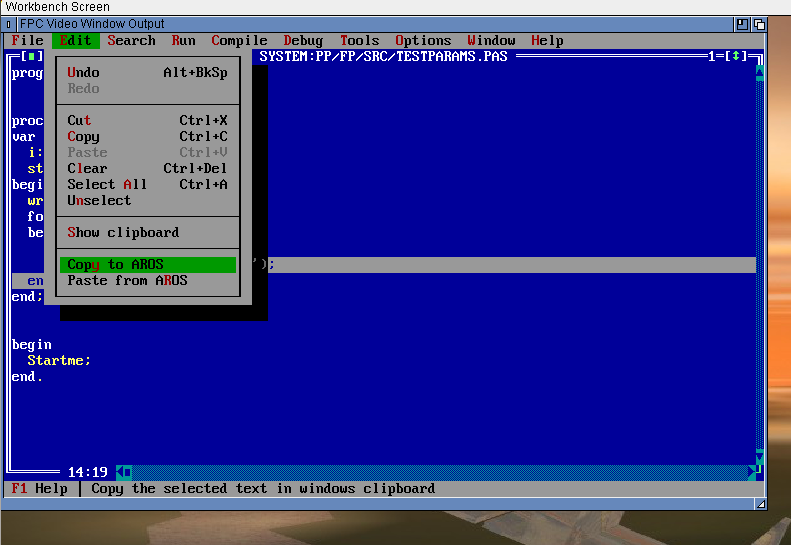
Today I bring all together and release. A not complete lists of changes/bugfixes for this realease:
* some basic units moved from arosunits to rtl, also helpful if later joined with amiga and morphos
– amigados, agraphics, exec, inputevent, intuition, layers,
– longarray, pastoc, tagsarray, timer, utility
– IMPORTANT: DELETE UNITS BEFORE INSTALL NEW VERSION TO GET RID OF UNITS IN OLD DIRECTORY
* changed all library calls to cdecl
* Startup and finishing code improved
* FileGetDate/FileSetDate implemented
* GetEnvironmentVariableCount/GetEnvironmentString implemented (example code by magorium)
* Video unit with fullscreen support (color tag = False)
* Keyboard unit rewritten, better identification of keys for fp ide, mousewheel as pgup/pgdwn
* free vision GetDosTicks implemented (needed for double click)
* layers aros unit (thanks to anon and magorium)
* FPGUI:
– MOUSEENTER/MOUSELEAVE implemented
– MOUSEMOVE with mouse grabbing
– KEYRELEASE implemented
– Input focus implemented
– Modal windows, blocking of other windows
– save closing of window (removing of messages from message port)
– combobox closing when a entry is selected repaired (hopefully)
check out https://blog.alb42.de/fpc-aros/ for the last Version
Sometimes when a Button or so is destroyed in runtime the software crashed because in the messageport still some messages for this particular object and I have no chance to see if it is still alive.
First Idea was to poll all messages before destroy this windowthis was implemented when writing the Message for 07.01.2013 in this blog the first error report. But now I noticed sometimes a stack overflow appear when large windows are closed.
When searching for CloseWindowSafely Amiga you find a lot of source snips which all do the same, remove all messages for this window from the messageport.
for example this
So the StripIntuiMessage is exactly what I need, conversation to Pascal is simple, the problem was it didn’t change the problem. I changed the routine that it counts how many messages are there and how many are removed. So at least it does something. Then I let the routine run twice one after the other so the second should not find a message and the overall should be smaller (because removed messages). I was surprised that the messages are not be removed.. so both runs are identical, I’m not sure whats wrong with my routine it does exactly the same as this C routine. So in the end I wrote a complete new routine, which gets all messages with GetMsg and then put them back with PutMsg when they not belong the removed window. Task done, now its working.
Another task I set for myself was the keybinding for fp-editor, and this is really crap, finally I think it would be easier to make a very big table for all cases, so all keys combinations with shift, alt, ctrl, sounds crazy but this keycodes have no real systematics. The most keys are working already… so menu keys, copy paste and so on, are working also mark text with keys is working, but still need some testing.