I just found out you can turn off the FPU with „VCONTROL FP=0“ sometimes it work, sometimes not (just crashing, if this because of my sloppy power on the Vampire or just bad timing, who knows). But after it you can start FEmu as with 2.5 and the testcodes work again. Also MUIMapparium FPU Version is working :-D.
In principle that would be the better alternative to the current situation, implement single precision inside the FPGA and trap the rest, which can then be covered by FEmu. Would make Quake and Demos and so on fast, but would not violate the IEEE 754.
In the current situation Amiga (Vampire) is not anymore IEEE 754 compliant. The Double format is now something like 24 bits significant (like IEEE Single) with 11 bits exponent (like IEEE double) because it can still go to 1e308 but the significant precision is much lower as shown before. Also strange if you multiply two big numbers to produce an overflow for example 1e200 * 1e200 in double precision that would give „+Inf“ or an exception, but Vampire FPU shows 1.8e+308 (something close to the max Double Value) and you can continue to calculate with that.
I played a little bit more with the Vampire FPU the yesterdays example shows an other interesting effect, the calculation of a * 1.3 shows an incorrect result. There is some problem in the last places when comparing with 68882 A1200 or 68060 UAE.
Let’s dig a little bit deeper into that, test how well the double precision calculation works. MUIMapparium needs Double precision everywhere, I tested to make it single but the calculation really get very wrong results (Eiffel tower somewhere near London, such stuff). To test double precision we multiply a very small value to 1 very often to see if it correctly handle the bits. for example like this:
program testfpu;
{$mode objfpc}
var
  i: Integer;
  b: Double;
begin
  b := 1;
  for i := 1 to 100000 do
  begin
    b := b * 1.0000000001;
  end;
  writeln(b);
end.
as you can see we multiply the 1 in b with 1 and a very little bit more, and this little bit more is just over the single precision limit. How the result look like:
Vampire 2.7
1.0000000000000000E+000
Amiga 1200 68882
1.0000100000502183E+000
Linux x86_64
1.0000100000494698E+000
ehm.. no Vampire thats wrong. Seems it does calculate all FPU calculations in single precision, so even they repair the rounding problem MUIMapparium still would be not usable.
Btw. I tried the same thing with the FEmu back in the days and it worked, as expected.
So maybe thats also the reason for the very good benchmark results… you make the calculations in single instead of double of course you can be much faster (and the original 68k FPUs calculate everything in extented so even more precise). I really think about to go back to Gold 2, it was slower but reliable.
As always the downloads: TestFPU3, TestFPU3.pas
I created a repository for MoGit on Github today. It was also the first time to really use MoGit in a real world situation and my first push using the MorphOS git client. Sadly there are some problems with the local certificates so I had to deactivate the certificate checking but besides this it worked nicely, MoGit and git. I was able to push to Github :-D.
The implementation yesterday was so easy that I thought it would be nice to also see/check the changes before you commit them (with git this is all a little bit strange because you have to „stage/add“ them) it was a little bit more difficult than I thought. The command line options are a little bit crazy sometimes not very logical. But it works now. Just open the MoGit with the parameter „check“ (the log view you get without it or with „log“ as first parameter, the second parameter should be the path to the repository to inspect)
Still quick and dirty 😉 but for me thats already a big help. I guess the development will stop here and I will continue on the MUIIDE. But still if someone interested: MoGit 0.1.
Wrote a little Makefile and added the MUIClass compilation to the Jenkins build server. On every change in the repository it will recompile MUIClass for all available platforms. At the occasion I noticed that I did some errors for 64 bit (Integer – PtrInt) also corrected this. The Jenkins compilation create a little archive with the compiled units, IDE and examples. If you download them together with FPC release archive for your platform it should be directly usable. It also creates the documentation directly and as archive on the build server.
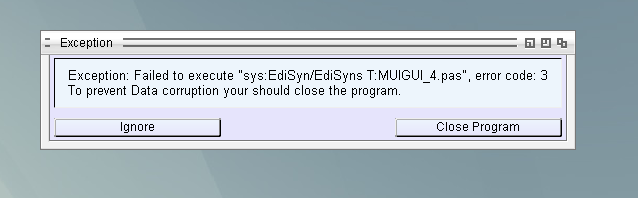
The exception handling I mentioned yesterday is improved. To satisfy MUI/Zune I put a try, except into every hook function before calling the Eventhandler, it makes sure the program returns from the hook to MUI/Zune. Of course the basic function is still the same, if the User decide to break the program, it will be terminated or if you connect the OnException event is assigned it gets triggered.
When an exception appears which is not covered by any try/except the program will just end (and print the exception to Debugout) which is not very nice. Again take some idea from LCL and catch all exceptions in the Event handler and show to user as nice MessageBox. But MUI certainly does not like it if you leave the Eventhandler in such a rude way 😉 (at least Zune on AROS) so after it the Eventhandler is dead because Zune thinks this is a circular calling. It’s not true but it’s prevents you to call that event again. Best thing here is to end the application an restart. Therefore I ask the user what to do, ignore the exception, knowing that this will have strange effects, or leave the program directly.
The ignore could be interesting if you have the chance to save your data before closing the program. Of course the writer of program can also override the Exception handling (via OnException Event in MuiApp, as used to from Delphi/LCL.
Working hard on the Event stuff for the MUI IDE. Hardest Part to find out how the Eventhandler parameter are via RTTI. In the end just some pointer calculation inside the RTTI structures.
The program already does some basic Source export. So it is somewhat usable! But I’m not sure if that is the final version or I will go the LCL way of some kind of hidden properties (for now the properties are written directly to the Source).
Some impression:
For sure is not finished, it has not saving/loading feature source name and editor name for editing the eventhandler are hard coded, and so on. But for now thats already very cool, at least I think so 😛
My MUIClass implementation is already rather advanced, the basic items are implemented, most of them are even tested and documentation. With this tools you can already write rather easily MUI GUIs but it would be even nicer to use a GUI to create it (especially because on some fields I’m not completely sure how this influence the final result). Already long time before I had some concepts for that in my Head but with the plain MUI classes and my little MUI knowledge thats just too difficult. Now with the MUIClasses and my increased knowledge when writing them 😉 it is possible. The Basic functionality of adding Stuff and changing properties are already there, all completely abstract (via FreePascal RTTI), so I do not need to implement every field for it by hand.
A little demonstration:
For now I only added some basics (Button, String, Text, Group) But the rest is rather the same. There is still much thinking to do with the advanced classes like ListView and so on (how to connect the List to ListView) and EventHandlers but this should be solvable. Also the Source export is not implemented until now, because I’m not completely sure which way I choose.
Basically there are two ways. The first one is more or less like Lazarus does it: The properties you set in the IDE are written to a resource file and without seeing them in the final sourcecode they are streamed to the objects on creation. If I choose that way I would not use resources (because Amiga68k still have no support for it) but maybe an include with a xml/json text which describes the GUI. This way has also the advantage that it is easier to read it back later (if you reopen the file in the IDE again).
The second way would be like fpGUI does, the IDE produces the complete Source to set the properties in the Source code. (with some helper comments to find them back when you reopen it). Advantage much easier to implement on the Saving Side, Disadvantage the Loading part can be very tricky if the User changed the Sources somehow. Still to decide, but so many other problems before that appear so no worry. 😛
The creation of vlink and vasm for Amiga is always a little bit difficult, hence I seldom do that. But Charlie told me, that the creator of vasm and vlink also supply executables for most of the platforms. Even the rather uncommon 68k asm with standard syntax (instead of Motorola syntax) are there. Long text, short meaning, the vlink and vasm for Amiga 68k, Amiga OS4 and MorphOS are updated in the nightly Release packages. And with this it will be much easier to keep them up to date.
Working on the documentation for the MUIClass objects and also implementing Dialogs (File, Font, ScreenMode). Found some stuff to improve in the MUIClass objects when writing the documentation, missed some fields, forget some return values.
The documentation can be found on this server.