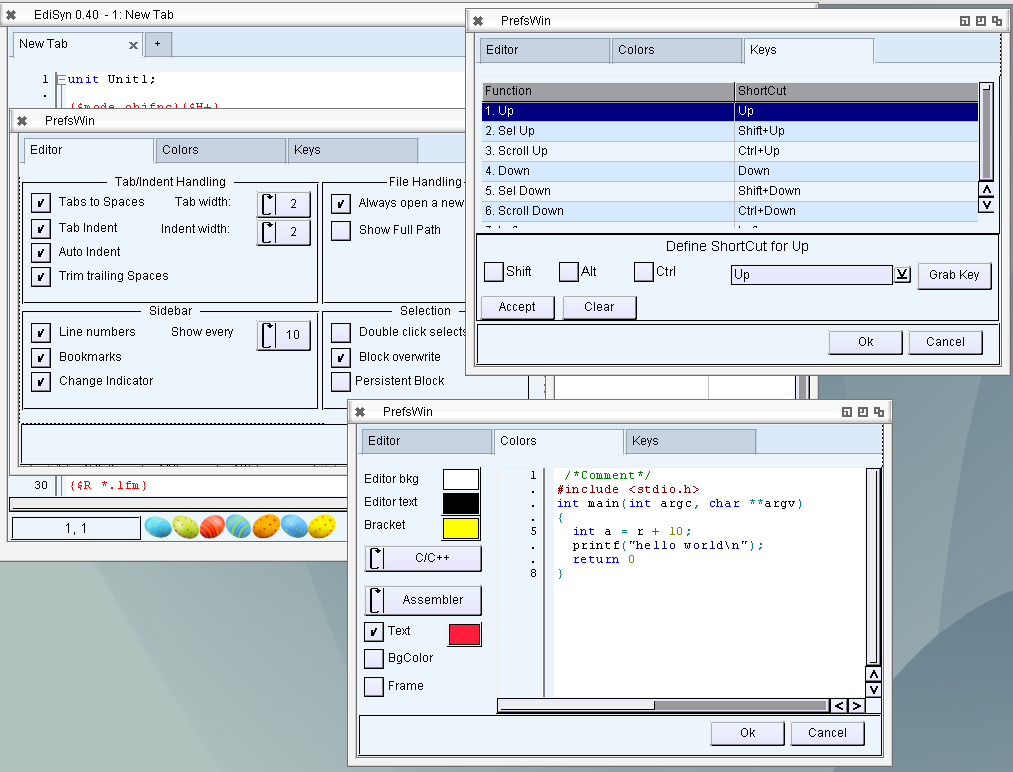
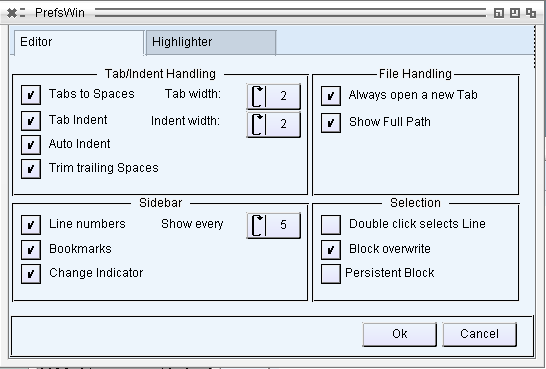
The new EdiSyn is out, Version 0.40.
Most important features should be the configuration possibility for the SynEdit control, inclusive Color selecting for Highlighter, and shortcut preferences.
The highlighter colors are saved in separate files.
- ADD: Preferences Dialog
- ADD: Key binding Dialog with Key catcher
- ADD: Highlighter Color selection Dialog
- ADD: New tab on every open
- ADD: Tab Navigation ShortCuts
- FIX: Faster New Tab
- FIX: Drawing improvement
- FIX: Menu Items Memory leak
- FIX: Canvas Memory leak
- ADD: Easter Eggs
Download at EdiSyn Page
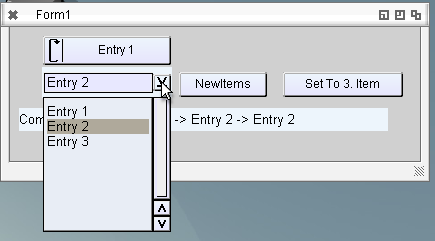
Until now the Combobox was only a fixed combobox, so only DropDownList ComboBox. But the DropDown Combobox where you can type new entries is also very practical. I found such a ComboBox in MUI named PopList. But of course it works completely different than the Cycle ComboBox but its not that many functions, so I implemented this second possibility if the ComboBox is marked as DropDown. I already got a request to also support automatic completition for it… but I’m not sure if this is possible with the MUI Edit component which is the heart of this component.
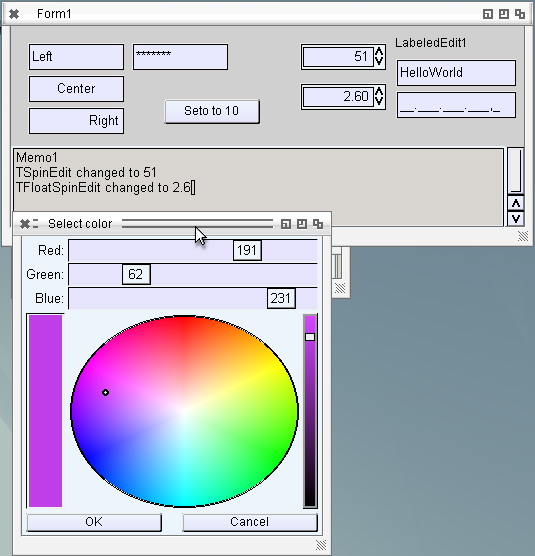
For TabWidth and so on in EdiSyn I need the spinedit, until now I always used a combobox or a TEdit, where I manually check if it is a Number. For me it is very interresting to make such a grouped object (Edit + two buttons) and it works really nice. So the main object is a horizontal group wich contains the edit and a vertical group with the two buttons. The outer group layout (Size/Position) is set by LCL but the Buttons and Edit is set by MUI self.
Rather straight forward actually, rather promising for further things. I’m thinking about to make the pagecontrol in the same way, so a Group with 2 other groups inside, one is the actual Pagecontrol with the different pages and the other one is the register with some fake childs just to show the registers. And if the number of pages change, the register just get destroyed and newly created with the new names (or on Pagename change). Just and idea…maybe an ownerdrawn register for the pagecontrol would be also possible. No hurry at this point, the ATTabs work very well.
I changed the colordialog from Palette to Coloradjust, now its exactly as I wanted to have, without the wasted space on the right side.
Working on the EdiSyn Preferences Window. I saw already before that a dialog style window has some problem (every redraw makes the window larger). In the past I just changed the window to sizeable and set tight Contraints (Min=Max), then it worked well. Today I had some time to look deeper into the stuff. I put a MUIC_Group into the Window as first item and On Layout I set the size of this item to the inner size of the window. But this Group has a Border (MUIA_InnerXXX) so a solution seemd to remov this border, but then MUI draws 1 pixel over the window border. So I had to add a 1 pixel border, but then I must calculate the inner size for the drawing. Now it works. As nice side effect now the (visible) offset of the item to the window border is gone, which is nice (visible in the left upper order of the window). The Groupbox (which is directly mapped to the MUI Groupbox with the Title) works very nicely, there I also need this offset value, so it had an additional use.
For the step of EdiSyn I will need a working color requester, the ASL does not supply one so I have to create one for myself. Not a big thing actually, just create a new local MUIApplication (I was not sure this is even possible to create two of them in the same process, but seems no problem until now) a Window with two buttons and the Palette object.
Again meet this strange MUI color needs 32 bit value for each color, but the requester only counts from 0..255. So its working nicely. The presets colors I cannot use currently, maybe later someone has fun to add another little panel with this colors and events to set them to the palette event. Currently its not that important I would say.
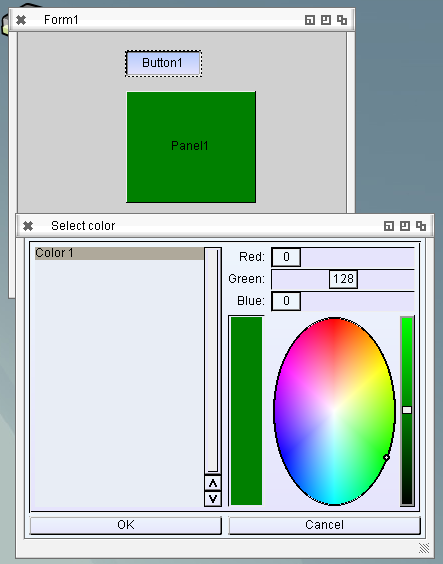
On the left side much space is wasted, it seems to be meant to change some pens at once, not only one as I need, but its working.
I also did a little bit research about the redraw problem if an ASL requester (or this one) is open, and hey the creators of MUI also thought to this problem, and there is a solution for it AROS MUIM_Application_CheckRefresh….. sadly its is not implemented in AROS, it does simply nothing.
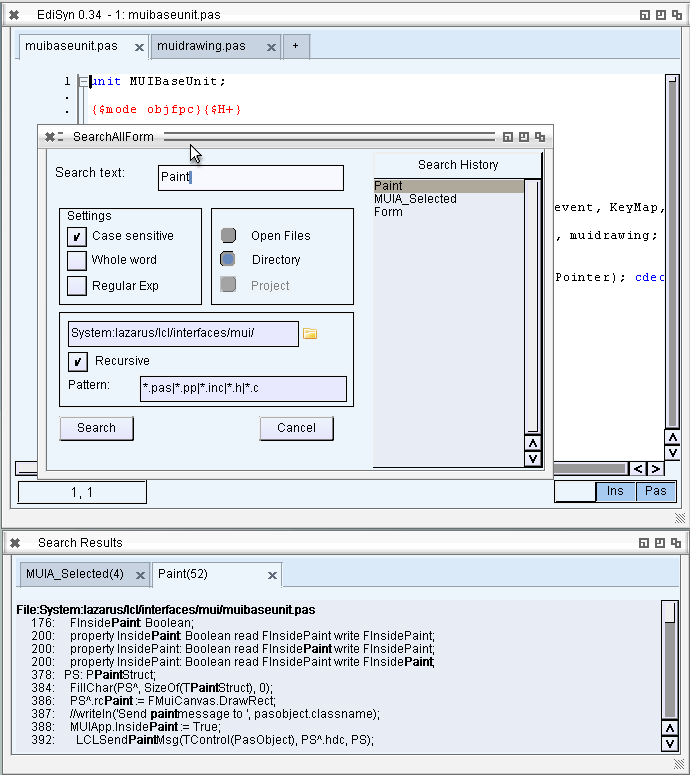
Search in all files is a very important feature for me, because I often search how the other widgetsets in LCL solved some problems. So my EdiSyn also should have this function. The implementation was rather straight forward but has some strange problems with the SynEditSearch, so I experienced many crashes, which is unusual for for development this days 😉 at least I hope so.
There are still some glitsches in the searchall function (most of all the Search histroy does not work, and I have no idea why, I see how the new list is transfered to the widget but then its empty :-O, so I deactivated it for now.) MAybe I have look into again later a little bit more in detail.
News:
- FIX: Warning for reopen file in same Tab removed
- FIX: Errormessage if a file cannot be open
- ADD: Search All requester (directory, open files)
- ADD: Search All result window with highlighting
Download at EdiSyn Page
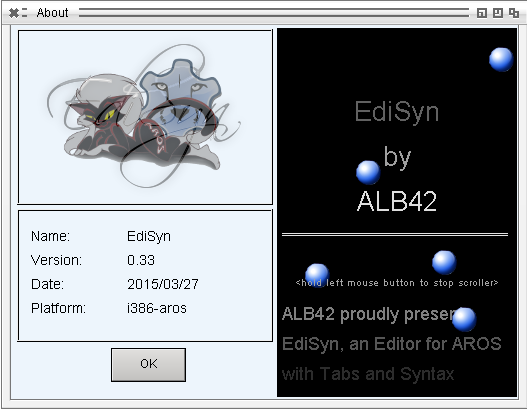
Last days I didn’t have much time to work on EdiSyn, much other things to do. And played little bit too much with the contents of the About box which should be introduced *shame on me*.
I added a smooth text scroller, seems magorium had the same idea and made crossfader. hmm both is nice, so I included both for the new release.
Besides this I got an idea hoe to slove some of the loop Notify problems. I also got a crash report, seems also related to the loop notify thing. Two things to reduce the notify loops: 1. Check if the value is changed, and only send to MUI if it has changed. 2. Block the Event if the Value is set by the interface. This should reduce the loop notifies and maybe the crash as well.
An other thing I noticed, seems I had a BIG memory hole in the code when drawing transparent Images to Canvas. The Canvas did no destroy the rastport/bitmap which was created if this Canvas is a free floating canvas, so not connected to a window/widget.
So here is a new release with some bugfixes and little improvements
EdiSyn 0.33
News:
- FIX: Beep also when searching backwards (Shift F3)
- ADD: Warn if a file is already open in the editor, jump to this tab
- ADD: Show full path in Window title.
- FIX: crash for un/checking TRadiobox
- ADD: About Box
Download at the EdiSyn Page
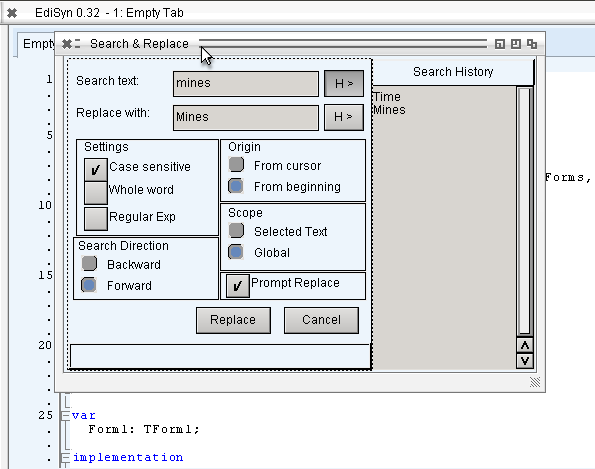
Search and Replace:
- ADD: Call Search dialog with selection -> used as search text
- ADD: Search Dialog improved
- ADD: Search and replace history
- ADD: Search Settings saved/restored
- FIX: Not Call Application to redraw
Download at the EdiSyn Page
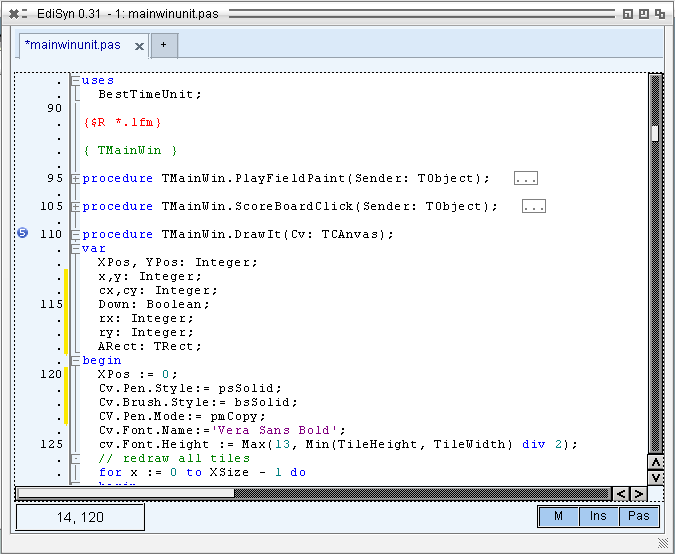
Some tiny improvements for EdiSyn:
- ADD: Bookmarks (Ctrl + Shift + 0..9 for set, Ctrl + 0..9 for jump to bookmark) in the picture Bookmark 5 is set.
- ADD: Bookmark bar can be switched on/off
- FIX: Crash when close a Tab via key removed (Focus issue)
- FIX: Better/faster creation of new Editor pages
- CHG: Show only every 5th line number, looks not so crowded
- FIX: TabStop setting for Replace Dialog (use tab from search to Replace edit field)
- CHG: Use MUI Requesters instead of EasyRequest -> looks nicer and the Window behind gets redraw events.
Download: EdiSyn 0.31
Woah, this winapi things in LCL is really crap sometimes… especially when it comes to doubled functionality. Exactly this is what I hit when I use Scrollbars. A single Scrollbar was easy to implement just some position conversation needed. I thought now all scrollbars would work… meeep … wrong, of course, the two fixed scrollbars for other wincontrol you have to implement separately. 🙂
Need me some hours to figure out how this work. and make it possible, now it pays that I made the Objects for the MUI classes so open, easy to reuse of „other“ purposes, for example this scrollbars. Works rather nice already, the biggest problems are always the loop notify calls, or what MUI think is a loop. If I move the scrollbar very fast.. its not a loop notify.. but just again changed in the time the event fired… so position gets a new value.
The caret problem was much easier than I thought. The caret is directly drawn to the Canvas, outside an Paint event. I noticed there is a variable to fire an invalidate instead of paint it. And voila, some other (QT, GTK) seems also need this event because not allowed to draw outside paint event.
Synedit with Working scrollbars