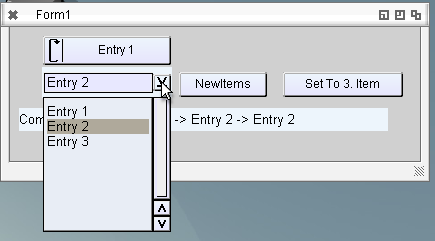
Until now the Combobox was only a fixed combobox, so only DropDownList ComboBox. But the DropDown Combobox where you can type new entries is also very practical. I found such a ComboBox in MUI named PopList. But of course it works completely different than the Cycle ComboBox but its not that many functions, so I implemented this second possibility if the ComboBox is marked as DropDown. I already got a request to also support automatic completition for it… but I’m not sure if this is possible with the MUI Edit component which is the heart of this component.
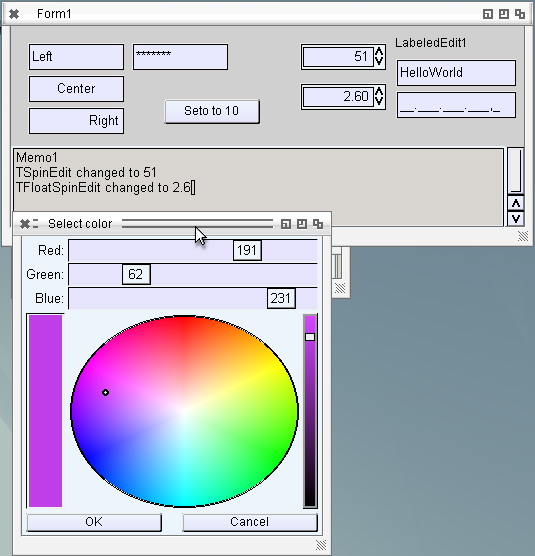
For TabWidth and so on in EdiSyn I need the spinedit, until now I always used a combobox or a TEdit, where I manually check if it is a Number. For me it is very interresting to make such a grouped object (Edit + two buttons) and it works really nice. So the main object is a horizontal group wich contains the edit and a vertical group with the two buttons. The outer group layout (Size/Position) is set by LCL but the Buttons and Edit is set by MUI self.
Rather straight forward actually, rather promising for further things. I’m thinking about to make the pagecontrol in the same way, so a Group with 2 other groups inside, one is the actual Pagecontrol with the different pages and the other one is the register with some fake childs just to show the registers. And if the number of pages change, the register just get destroyed and newly created with the new names (or on Pagename change). Just and idea…maybe an ownerdrawn register for the pagecontrol would be also possible. No hurry at this point, the ATTabs work very well.
I changed the colordialog from Palette to Coloradjust, now its exactly as I wanted to have, without the wasted space on the right side.
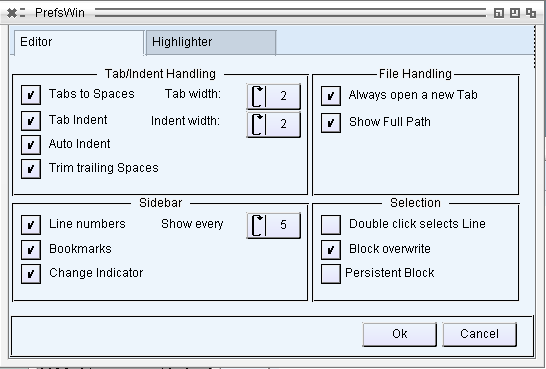
Working on the EdiSyn Preferences Window. I saw already before that a dialog style window has some problem (every redraw makes the window larger). In the past I just changed the window to sizeable and set tight Contraints (Min=Max), then it worked well. Today I had some time to look deeper into the stuff. I put a MUIC_Group into the Window as first item and On Layout I set the size of this item to the inner size of the window. But this Group has a Border (MUIA_InnerXXX) so a solution seemd to remov this border, but then MUI draws 1 pixel over the window border. So I had to add a 1 pixel border, but then I must calculate the inner size for the drawing. Now it works. As nice side effect now the (visible) offset of the item to the window border is gone, which is nice (visible in the left upper order of the window). The Groupbox (which is directly mapped to the MUI Groupbox with the Title) works very nicely, there I also need this offset value, so it had an additional use.